


The quickest way to start collecting tips from your Instagram audience is to create a dedicated tip link, like the one Tipper generates, and drop it into your bio. A tip link is different from a regular URL: it opens a mobile-first checkout where a supporter can pay with Apple Pay, Google Pay, or a card in a few taps, with no account or app download required on their end. You get a notification the moment someone tips, and the money lands in your account directly.
Here’s what that setup actually gets you:
- A checkout built for phones, since almost every click will come from someone scrolling Instagram on their phone
- Instant alerts so you know exactly when and how much someone sent
- Direct payouts without waiting on a middleman platform to release your earnings
The next move is simple: create your tip page, copy the link, and paste it into your Instagram bio or add it through the Links editor in your profile settings.
Key Takeaways
A working Instagram tip link needs a no-account checkout, correct payout setup, and placement in your bio’s top link slot to actually convert.
| Point | Details |
|---|---|
| Use a dedicated tip page | Choose a provider like Tipper that supports Apple Pay, Google Pay, and cards without requiring the sender to sign up. |
| Claim the top bio link slot | Instagram’s Links editor allows up to five links, but the first one gets the most visibility. |
| Test before promoting | Send yourself a small test tip and confirm the notification, receipt, and payout all arrive correctly. |
| Confirm payout details early | Missing bank or tax information can delay or forfeit funds that already came through. |
| Tipper keeps creators fully paid | Creators keep 100% of their earnings on Tipper, with thank-you notes and videos available for supporters. |
Table of Contents
- How to Set Up Your Instagram Tip Link
- Where to Put Your Tip Link on Instagram
- Getting Tips Without Annoying Your Followers
- What to Check Before You Promote Your Link
- Test Your Tip Link Before You Go Live
- Why Tipper Fits What Creators Actually Need
- The Real Priority Creators Miss
- Start Collecting Tips With Tipper Today
- Sources
- FAQ
How to Set Up Your Instagram Tip Link
Getting a tip link live takes less time than editing a Reel. Here’s the order that works.
-
Pick a tip page provider and create your account. Tipper is built specifically for this job, letting anyone send a tip without creating an account of their own, which removes the single biggest source of drop-off on payment pages.
-
Customize your page. Add your display name, a profile photo people recognize from your Instagram grid, and a short line explaining what the tips support. Include at least one micro-tip option ($1 to $3) so first-time supporters have a low-pressure way in.
-
Connect your payment methods. Cards, Apple Pay, and Google Pay should all be active before you share the link anywhere. Bio sites with tip jar features typically route these through a processor like Stripe, and some tools let you choose between an external payment link or an integrated checkout that keeps the sender on your page instead of bouncing them to another app or site.
-
Set up payouts. Add your bank details and any required tax information now, not after your first tip arrives. Skipping this step is the most common reason creators see a payment go through but never see the cash.
-
Generate your shareable URL and QR code. Copy the link for your bio, and grab the QR version for in-person use, like a tip jar at a pop-up shop or a sticker on a merch table. If you want to track which posts drive tips, shorten the link and tag it with a UTM parameter first.
Pro Tip: Create two versions of your link before you post anything: one plain link for your permanent bio slot, and one UTM-tagged short link you swap into captions or Stories for specific campaigns. That split lets you see which content actually drives tips instead of guessing.
Where to Put Your Tip Link on Instagram
Your bio is prime real estate, and Instagram’s Links editor now lets you add up to five external links to your profile. The first link you add is the one that shows with the most visibility, so your tip link should almost always take that top slot, especially if you’re not running it through a separate link-in-bio hub.
Beyond the bio, a few placements consistently outperform a single static link:
- The link sticker in Stories, used right after a tutorial or a piece of content that clearly helped someone
- A pinned post with your tip link in the caption, so it stays visible at the top of your grid
- Direct messages, reserved for higher-value asks or one-on-one requests where a personal touch matters
Keep your link title and bio copy short and low-pressure. “Buy me a coffee” or “Send a tip if this helped” reads friendlier than “Donate here,” and it sets the expectation that tipping is optional appreciation, not an obligation. Bitly’s guidance on bio links recommends pairing one permanent bio link with trackable short links for individual campaigns, which lets you measure which specific posts actually convert into tips instead of lumping everything into one number.
Getting Tips Without Annoying Your Followers
Nobody likes a feed that feels like a nonstop ask. The creators who tip well tend to follow a pattern, not a script.
- Offer three price points. Offer three price points with low, mid, and higher options to accommodate casual supporters, regular followers, and your biggest fans.
- Use a short CTA tied to value, not guilt. “If this saved you time, leave a tip” works better than a bare “Donate now,” because it reminds people why they’d want to give in the first place.
- Time the ask around value-first content. Attach your tip link to the post where you actually delivered something useful. A tutorial, a template, or a thread that solved a real problem earns a tip request far better than a random selfie.
- Acknowledge every tip. A quick public shoutout or a private thank-you note (or video) turns a one-time tipper into a repeat one. Visible acknowledgment tends to increase repeat tipping, since it makes the transaction feel like a relationship instead of a payment.
Pro Tip: Save your best-performing CTA line and reuse it. Followers respond to consistency, and a familiar phrase like “Send a tip” builds recognition the same way a catchphrase does.
What to Check Before You Promote Your Link
A few unglamorous checks now save you a frustrating email later.
- Fees: expect a standard payment processing fee on card, Apple Pay, and Google Pay transactions, plus any platform fee your provider charges. Confirm the exact numbers in your account settings before you promote the link widely.
- Payouts: enter your bank details and tax information correctly the first time. Incomplete payout setup can delay or forfeit funds that already came through on the sender’s end.
- Privacy: make “no account required” messaging visible near your link so first-time supporters aren’t confused about what’s expected of them, and keep any privacy note short enough that people actually read it.
Test Your Tip Link Before You Go Live
Don’t promote a link you haven’t tried yourself. Run through this before it hits your bio.
- Open the link on a few different devices. Check that Apple Pay, Google Pay, and card fields all render correctly on both iPhone and Android.
- Send yourself a small test tip. A dollar is enough. Confirm you get the notification, the sender gets a receipt, and the money shows up in your payout account.
- If nothing shows up, check three things first: your payout settings, your email for a receipt you might have missed, and the transaction log in your dashboard. If it’s still missing, contact support with the transaction ID ready.
Why Tipper Fits What Creators Actually Need
Most friction in online tipping comes from asking supporters to create an account just to send a few dollars. Tipper skips that step entirely, letting anyone tip through a personalized link or QR code using Apple Pay, Google Pay, or a card, with no sign-up on the sender’s side.
The bigger draw for creators is what happens after the tip lands.
A tipping tool only earns trust if the person sending money feels zero friction and the person receiving it feels fully rewarded. That’s the gap Tipper is built to close.
A few specifics worth knowing before you set up your page:
- Thank-you messages can be sent as text, photo, or video, so appreciation feels personal instead of automated
- Notifications arrive in real time, so you know the instant a tip comes through
- Setup guidance and onboarding resources walk you through connecting payments and generating your link
The Real Priority Creators Miss
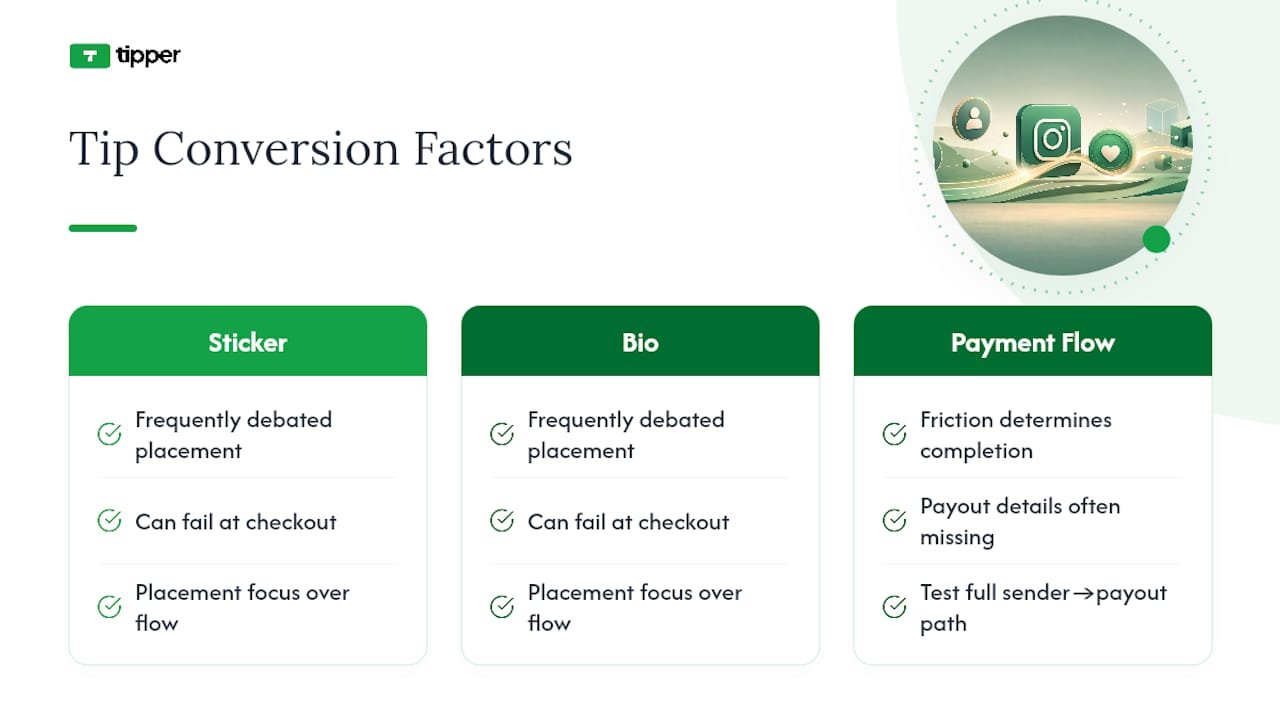
Most advice on this topic obsesses over link placement and ignores what actually determines whether someone tips: how much friction sits between the tap and the payment landing in your pocket. Creators spend hours debating whether the link sticker or the bio slot converts better, and almost no time checking whether their payout details are even filled in correctly.

That’s backward. A perfectly placed link that fails at checkout is worse than a mediocre placement with a flawless payment flow, because a failed tip rarely gets retried. Test the entire path, sender tap to your payout landing, before you worry about optimizing where the link sits.
The other overrated habit is treating tip requests like a marketing campaign. The creators who build real recurring tipping income tend to ask rarely and only after delivering something worth paying for. Ask constantly, and even generous followers start to tune it out.
If you take one thing from this: fix the payment experience first, keep the ask occasional and specific, and let the placement details come second.
— Tipper
Start Collecting Tips With Tipper Today
Tipper is the alternative to juggling app downloads and account sign-ups just to collect a few dollars from a follower. Supporters tip through a personalized link or QR code using Apple Pay, Google Pay, or a card, with nothing to install and no account to create, and you keep 100% of what comes in.

Setting up takes about the same time as writing a caption. Create your page, add a short description and your suggested tip amounts, connect your payment methods, and copy your link straight into your Instagram bio. If you already run a bio hub with multiple links, you can add tipping to that setup without disrupting anything else you’re linking to. Creators who also teach or sell courses can look at platforms like Hopper for combining a linked storefront with payments in one place.
Ready to see it live? Create your Tipper page and have a working tip link ready before your next post goes up.
Sources
- How to Use Link in Bio on Instagram (Bitly)
- Instagram now allows 5 links in bio — here’s how to add them (CNET)
- Monetize your link in bio (Squarespace)
- Linktree payments: how to add payment links (Shuttle/Linktree guide)
FAQ
What Is the Easiest Way to Add a Tip Link to Instagram?
Create a tip page through a provider like Tipper, then paste the link into your Instagram bio using the Links editor or add it as your top link if you use multiple.
Do Supporters Need an Account to Send a Tip?
No. Tipper lets anyone send a tip through Apple Pay, Google Pay, or a card without creating an account first.
Where Should I Place My Tip Link for the Best Results?
Put it in the top slot of your bio, then reinforce it with Story link stickers and pinned posts tied to your most valuable content.
How Do I Know My Tip Link Is Actually Working?
Send yourself a small test tip and confirm you receive the notification, the sender gets a receipt, and the payout appears in your account.
What Fees Should I Expect on Instagram Tips?
Expect standard payment processing fees on card, Apple Pay, and Google Pay transactions, plus any platform fee, both visible in your account settings before you promote your link.




[…] The Fastest Way to Add an Instagram Tip Link […]